Combining an ARM edge gateway with Node-RED and the OPC UA protocol enables efficient data collection and monitoring of Fanuc CNC machines.
Case Details
With the advancement of Industry 4.0, the demand for real-time data acquisition and integration in manufacturing has grown significantly. Fanuc CNC (Computer Numerical Control) machines, as core equipment in industrial production, require data collection and monitoring to optimize processes and enhance efficiency. ARM Edge Gateways, with their low power consumption and high performance, are ideal for industrial IoT applications. By leveraging Node-RED’s flexible workflow design and the standardized OPC UA protocol, seamless data acquisition and monitoring from Fanuc CNC machines can be achieved. This article details how to use an ARM Edge Gateways with Node-RED to collect Fanuc CNC data and integrate it into OPC UA for monitoring.
System Architecture
The system architecture comprises the following components:
- Fanuc CNC Machine: Provides operational data such as machining status, spindle speed, and tool position.
- ARM Edge Gateway ARMxy series: Runs Node-RED for edge computing, handling data acquisition, processing, and protocol conversion.
- Node-RED: A flow-based programming tool for designing data acquisition and processing workflows.
- OPC UA Server: Offers a standardized data access interface for upper-level systems or monitoring software.
- Monitoring System: Such as SCADA or MES, which retrieves data via OPC UA for analysis and visualization.
The data flow is: Fanuc CNC → ARM Gateway (Node-RED) → OPC UA Server → Monitoring System.
Implementation Steps
Configure the ARM Edge Gateway
The ARM edge gateway (e.g., ARM Edge Gateway ARMxy or Raspberry Pi) requires a Linux operating system (e.g., Ubuntu or Raspbian). Key steps include:
- Install Node-RED:
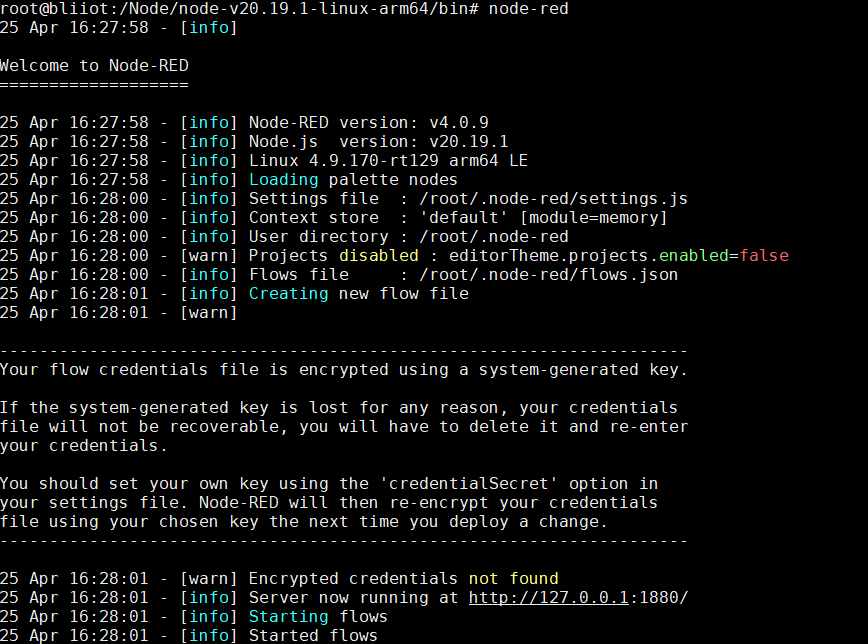
After installation, start the service with node-red, accessible by default at http://:1880.
- Install Dependencies: Ensure the gateway supports Node.js and relevant communication libraries (e.g., FOCAS library for Fanuc CNC communication).
- Network Configuration: Ensure the gateway is on the same network as the Fanuc CNC and upper-level systems, and configure a static IP for stable communication.
Configure Fanuc CNC Data Interface
Fanuc CNC machines typically provide data access via the FOCAS (Fanuc Open CNC API Specification) protocol. Install the FOCAS library or related drivers on the gateway and ensure the machine’s Ethernet module is enabled.
- Verify Connection: Test the connection to the CNC using a FOCAS client tool to retrieve machine status, parameters, and machining data.
- Select Data Points: Choose data points to collect based on requirements, such as spindle speed (RPM), feed rate, or machining time.
Node-RED Workflow Design
Node-RED simplifies data acquisition and processing through a visual interface. Key configuration steps include:
Configure OPC UA Server
Deploy an OPC UA server (e.g., open62541 or Node-OPCUA) on the ARM gateway or a separate server. Key steps include:
- Install OPC UA Server
- Configure Server: Set up the server endpoint (e.g., opc.tcp://:4840) and define the namespace and variable structure.
- Map Data: Map Node-RED output data to the OPC UA server’s variable nodes, ensuring real-time updates.
Integration and Monitoring
- Connect Monitoring System: Use an OPC UA-compatible SCADA or MES system (e.g., Ignition, WinCC), configure the client to connect to the OPC UA server, and subscribe to required variables.
- Data Visualization: Create dashboards in the monitoring system to display real-time Fanuc CNC data, such as spindle speed and machining status.
- Alarms and Analysis: Configure alarm rules (e.g., for abnormal spindle speed) and perform historical data analysis to optimize production.
Considerations
- Network Security:
- In industrial environments, configure firewalls and VPNs to ensure secure data transmission.
- Enable authentication and encryption for the OPC UA server.
- Performance Optimization:
- Adjust Node-RED’s data acquisition frequency (e.g., once per second) to avoid impacting CNC performance.
- Use the ARM gateway’s low-power mode for long-term operational stability.
- Error Handling:
- Add error-catching nodes in the Node-RED workflow to handle communication interruptions or data anomalies.
- Configure logging for debugging and maintenance.
Conclusion
By combining an ARM Edge Gateway ARMxy series with Node-RED and the OPC UA protocol, efficient data acquisition and monitoring from Fanuc CNC machines can be achieved. This solution is cost-effective, flexible, and scalable, making it suitable for small and medium-sized manufacturing enterprises. In the future, integrating AI analytics modules can enable predictive maintenance, further advancing smart manufacturing.


